Run your live business
like a tycoon game.
Levels, host cards, a live bonus bar, month-end awards — and a board that tells you every morning whether the month is on pace, and which lever to pull today. Built inside a live-commerce agency: 300+ hosts hired, 60 live at peak, three years of payroll run on it.

Sound familiar?
Every live team hits the same four walls once it passes three hosts.
One number. Two levers.
GMV is live hours times GMV per hour. Everything in TTLive pushes one of those two — and the board tells you which one to push today.
GMV=live hours×GMV per hour
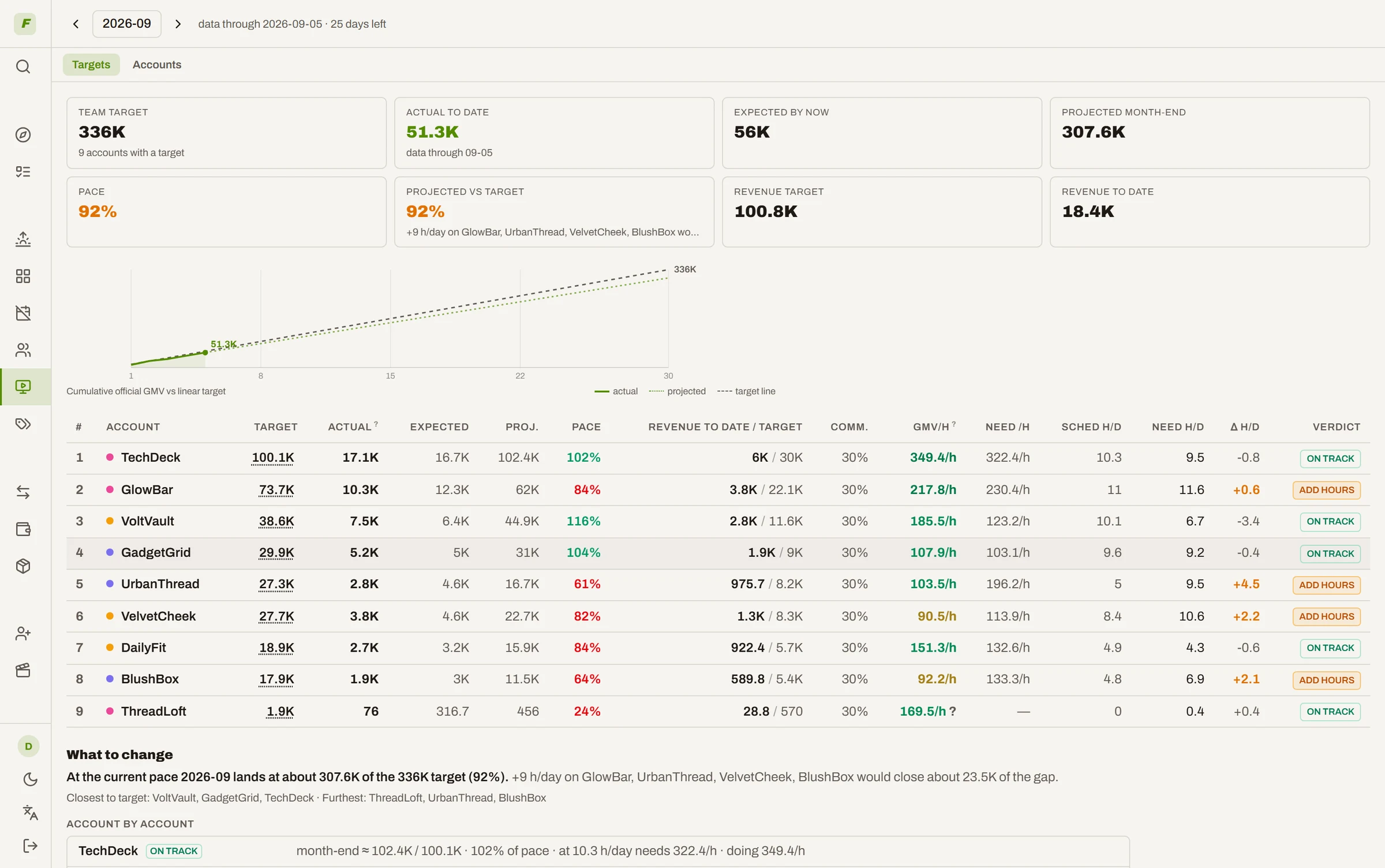
Set each account's GMV target for the month. The board shows official progress against it, whether the pace holds, and how many more live hours it would take at that account's real GMV/h.
Hosts hired × days they actually show up × hours the grid actually fills. Every host, every day, has a shift or a reason — the board won't let a day quietly go missing.
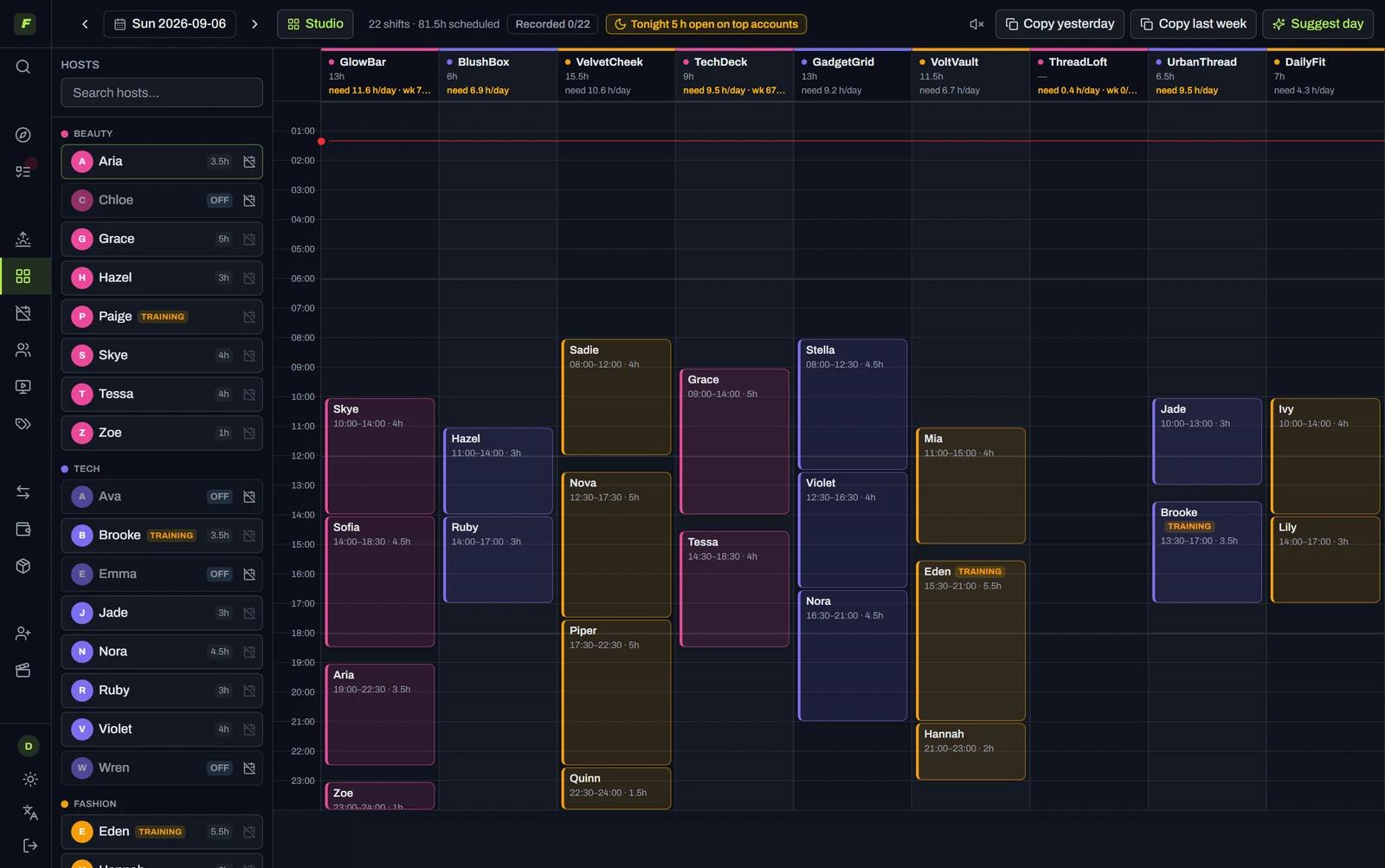
The right host on the right account at the right hour, selling the right product. The AI drafts it; you decide it.
Two levers. One loop that pulls them.
A hiring tool can't schedule. A scheduler doesn't know who you hired or how she sells. TTLive runs the whole loop — and every live session makes the next decision sharper.
- 01Hireevery CV and audition kept
- 02Trainsign / watch / cut, on numbers
- 03ScheduleAI puts each host in her best hour
- 04SellGMV per host, per account, per hour
- ↺Feeds backresults retrain the model — and tell you who to hire next
Lever 1 · Live hours
Hire on a record, not a hunch
The pain: CVs and audition clips die in a WhatsApp thread, and the candidates you rejected teach you nothing.
What we do: a funnel from sourced to signed, with every CV and intro video kept as a labeled dataset — the hires and the rejects.
What you get: a hiring record that compounds. Once a candidate becomes a host, her real GMV/h flows back against the source she came from, so you learn which channel actually produces sellers.
- Sourced → screened → audition → trained → signed, in one board
- Intro videos and CVs stored, not scattered
- ROI by source, once your hires start selling
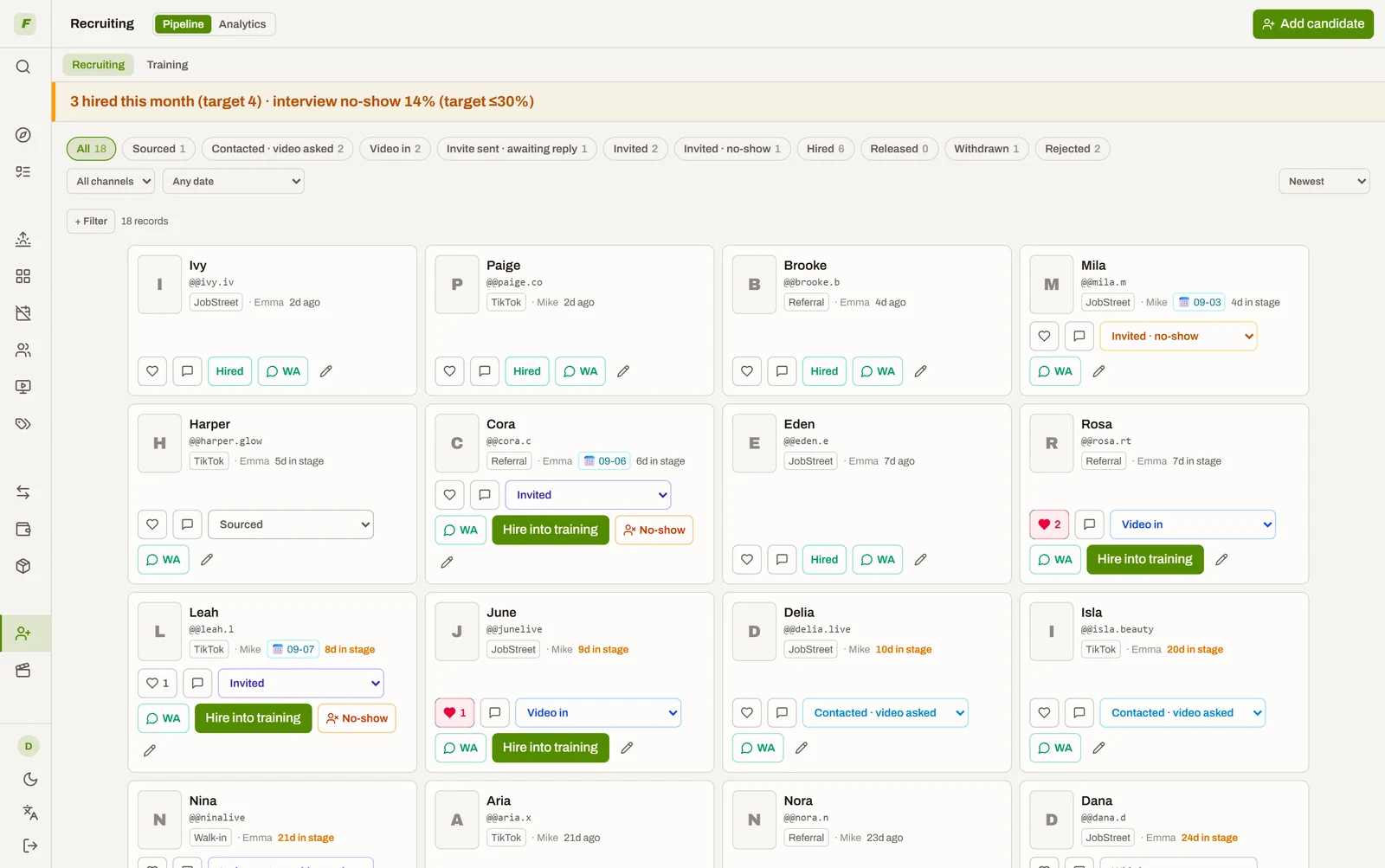
Call the trainee on evidence, not nerve
The pain: sign her or cut her? With no numbers the safe move is to wait — and a trainee who should have been cut on day 5 costs you a month of prime slots.
What we do: once her first sessions land, the system reads her real GMV/hour against the same tiers your veterans are ranked on and returns a verdict: sign · keep watching · release.
What you get: the decision gets made, in week one, on the same yardstick for everyone.
- Advisory, never automatic — the system argues, you decide
- No-shows are disqualifying; small samples say "keep watching"
- Same GMV/h tiers as the main leaderboard — one yardstick
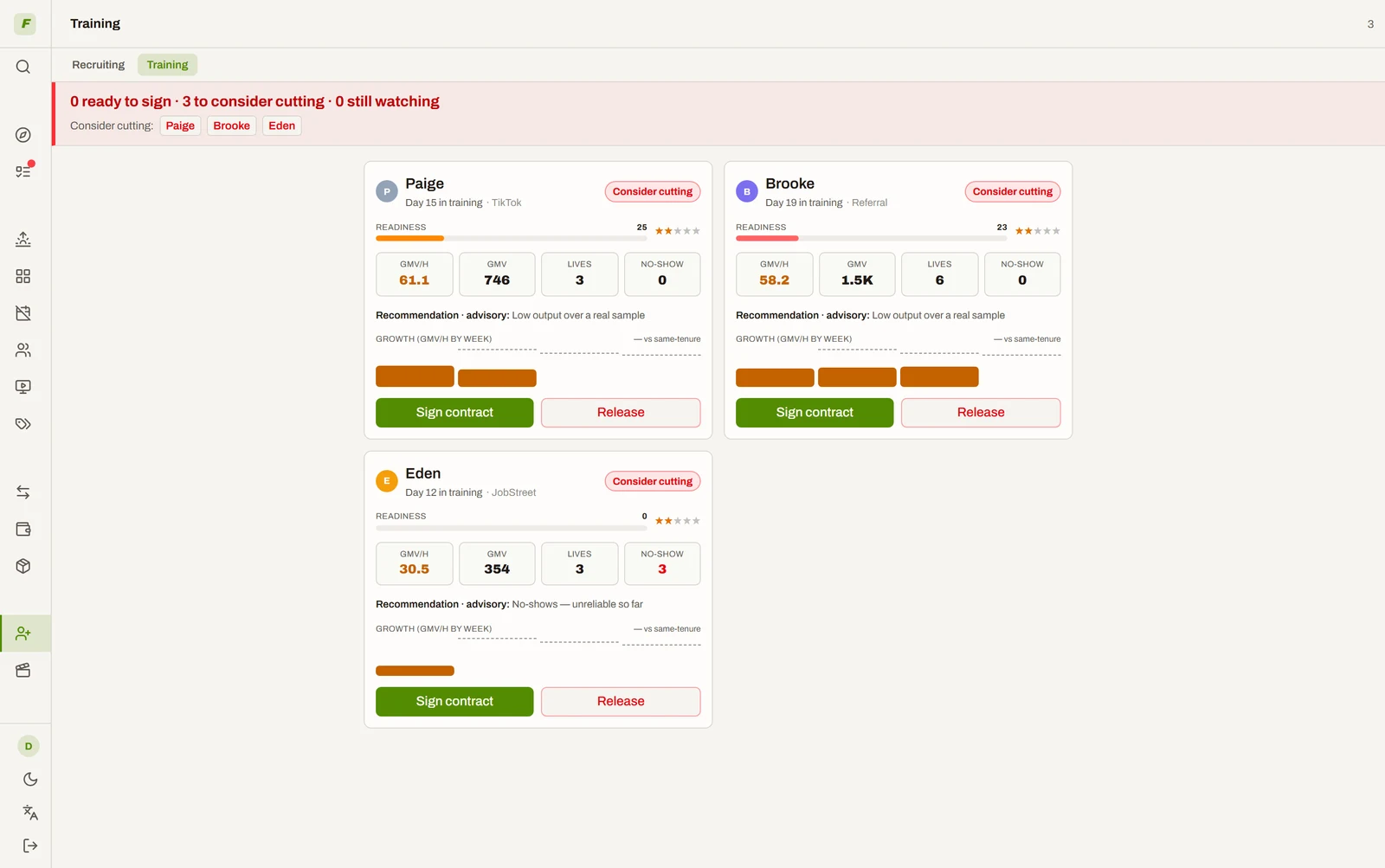
Every host, every day: a shift or a reason
The pain: a host who quietly stops showing up costs a month of prime slots before anyone notices.
What we do: every active host must have a shift or an absence mark for every day, by a deadline you set. The month view shows the gaps as dotted cells, and the month can't close over them. Plan versus actual is measured against the schedule as it stood that morning — editing it afterwards doesn't rewrite history.
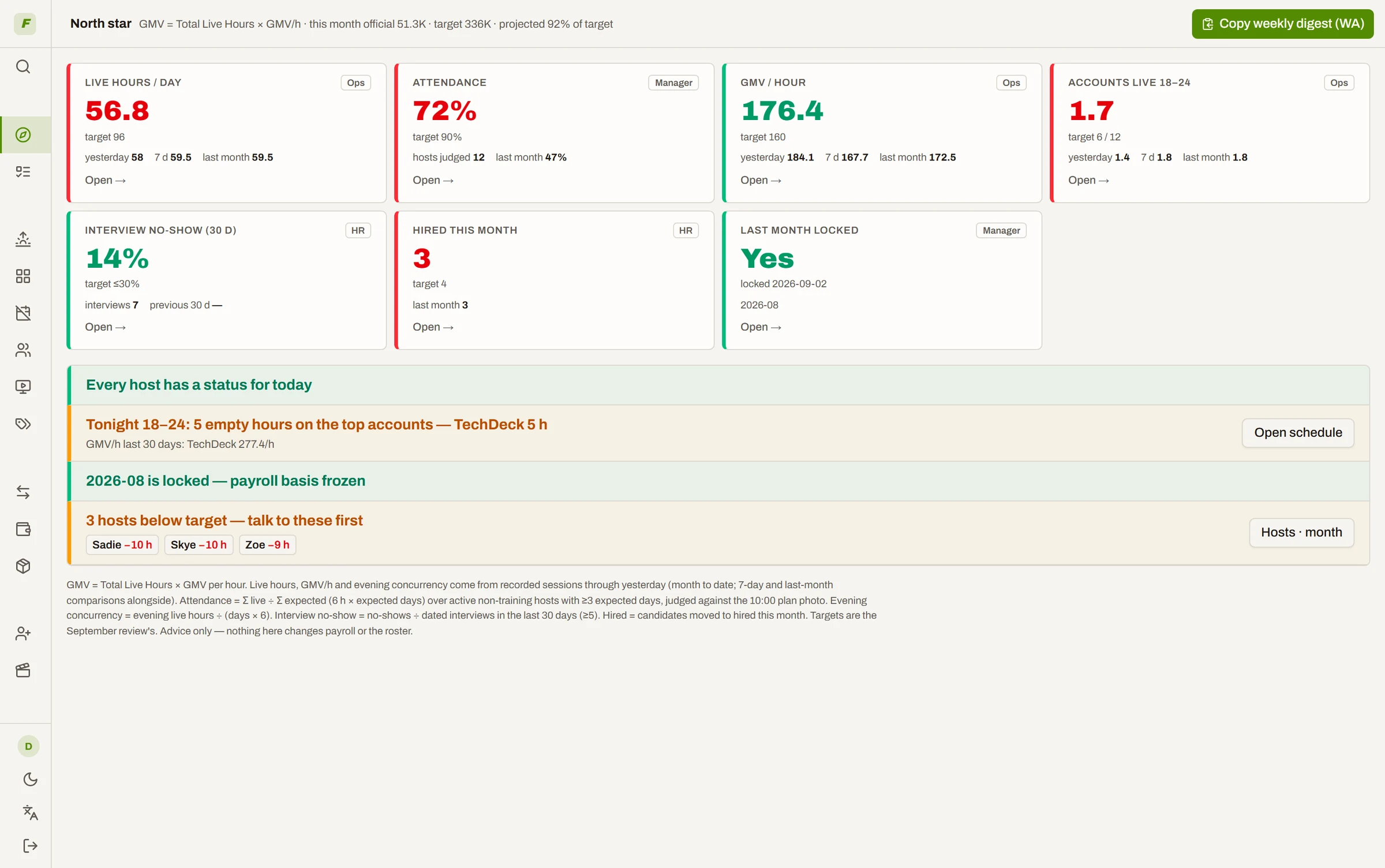
What you get: attendance you can see, and the three people to talk to first.
- Live hours against expected hours per host, the shortfall in plain sight
- Editing the plan after the fact never changes the record
- A list of who to talk to — whether you do is your call
Lever 2 · GMV per hour
The AI puts every host in her best hour
The pain: prime hours go to whoever was easiest to reach, and a sick day rebuilds the whole table.
What we do: the model estimates expected GMV/hour for every host × account × hour — recency-weighted, so last month counts more than last year, and shrunk toward a prior so a host with two sessions isn't mistaken for a star. Then a solver fills the empty slots against it, inside your hard rules.
What you get: a full day drafted in one click — and you accept or dismiss it block by block.
- Expected GMV shown before you commit a slot
- Never crosses a host onto another category's accounts, never exceeds her daily hours, never books someone on leave
- A draft, not a decision — nothing lands on the grid until you say so
- Evening prime slots on your strongest accounts get filled first
↓ One click. A full day, drafted. (real product, real speed)
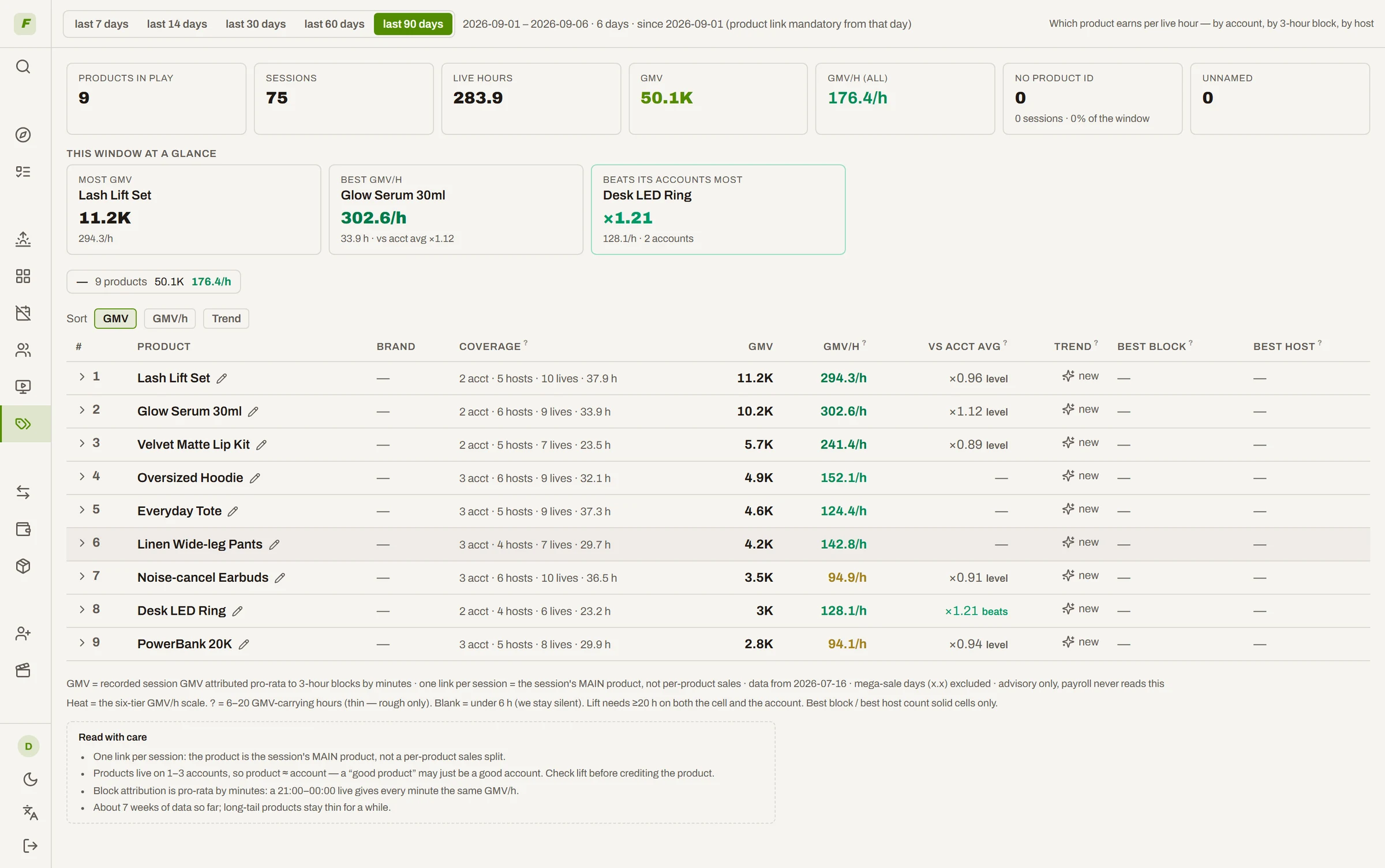
Which product, on which account, at which hour
The pain: "she sells well" is a feeling until you know what she was selling.
What we do: every session carries its main product link. The board shows product × account × 3-hour block, which products beat the account's average, and which are worth more hours. The scheduler's draft picks each account's usual product and flags when an alternative looks stronger.
What you get: the third dimension of scheduling — not just who and when, but what.
- GMV per hour by product, account and time block
- Lift against the account's own average — only when there's enough data to say so
- The draft carries a product; a stronger alternative is a hint, never a swap
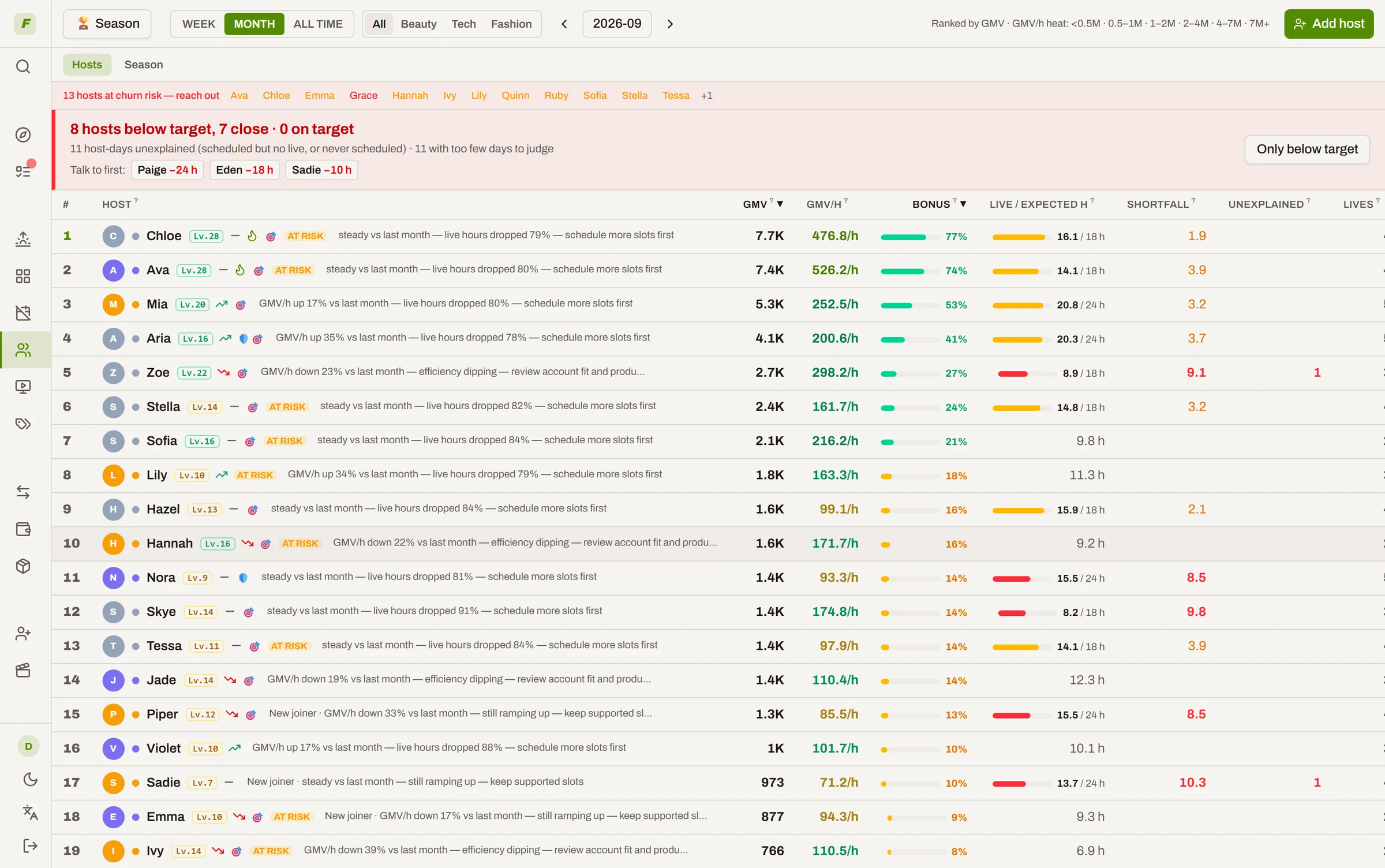
Every session sharpens the next decision
The pain: GMV per host per hour lives in ten screenshots and three tabs, so "who's good" stays a feeling — and this month's data changes nothing about next month.
What we do: every logged session flows straight back into the loop. It updates her expected GMV/h, her rank and heat, her level and bonus pace, the coach's note on her row — and the verdict waiting on the next trainee.
What you get: a system that gets more accurate the longer you run it. That compounding is the part a competitor cannot copy.
- GMV/h heat: see instantly who's worth prime hours
- Trend vs last period, new-joiner ramp, bonus projection
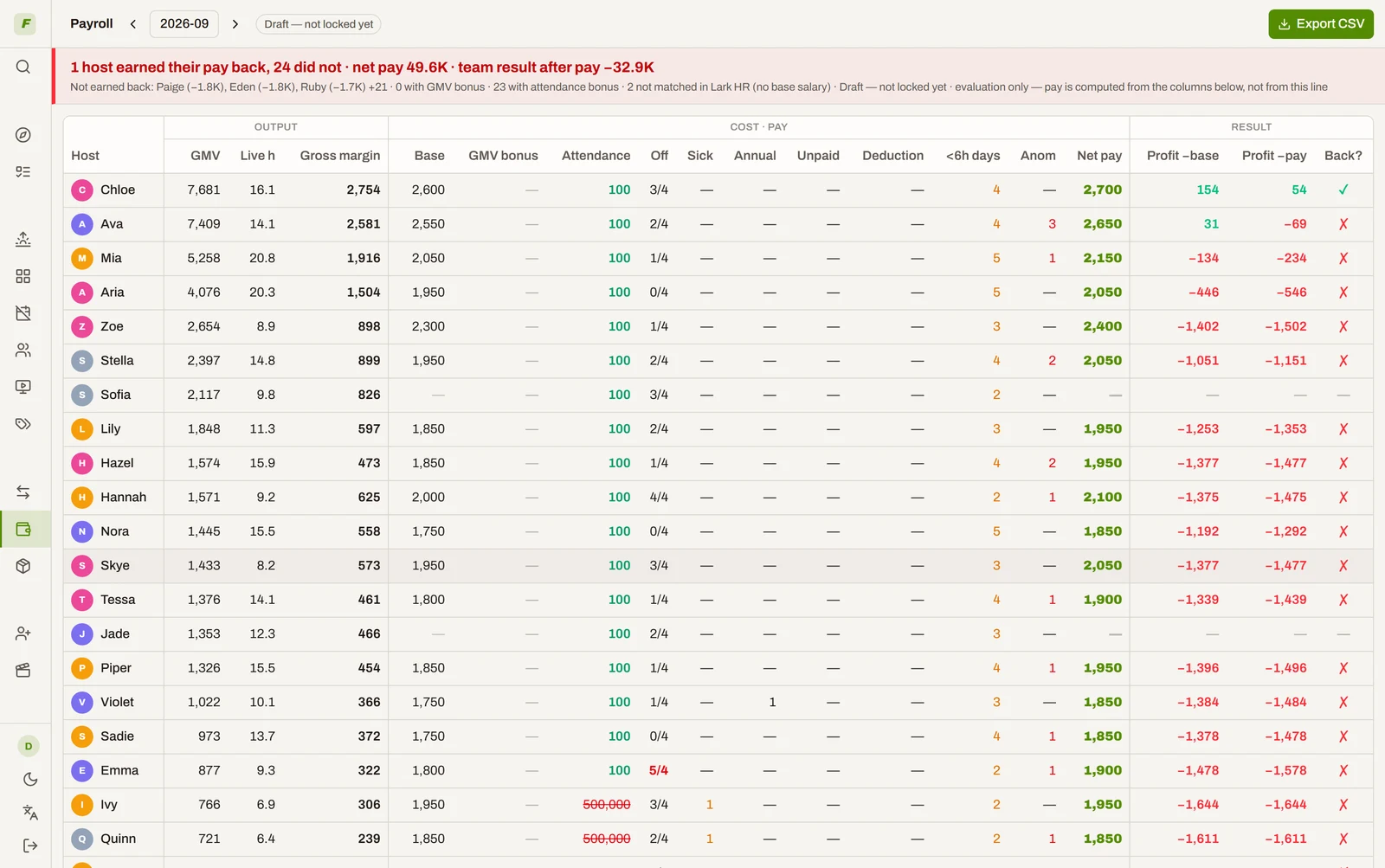
- Contribution margin vs salary — who earns their pay back
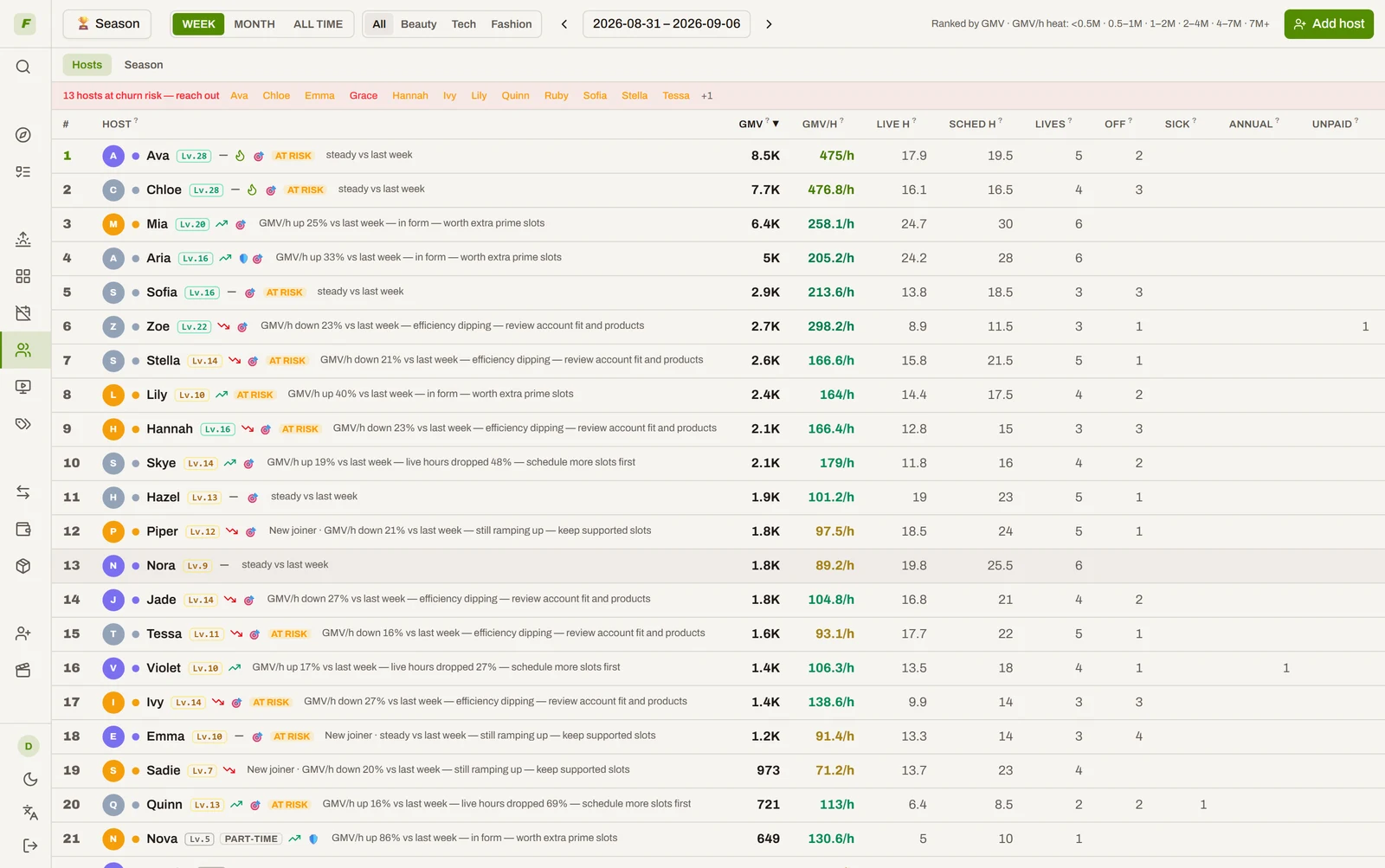
Levels, host cards, season awards — hosts who want to climb
The pain: hosts don't know where they rank or how far they are from the bonus — so they just "show up for a shift".
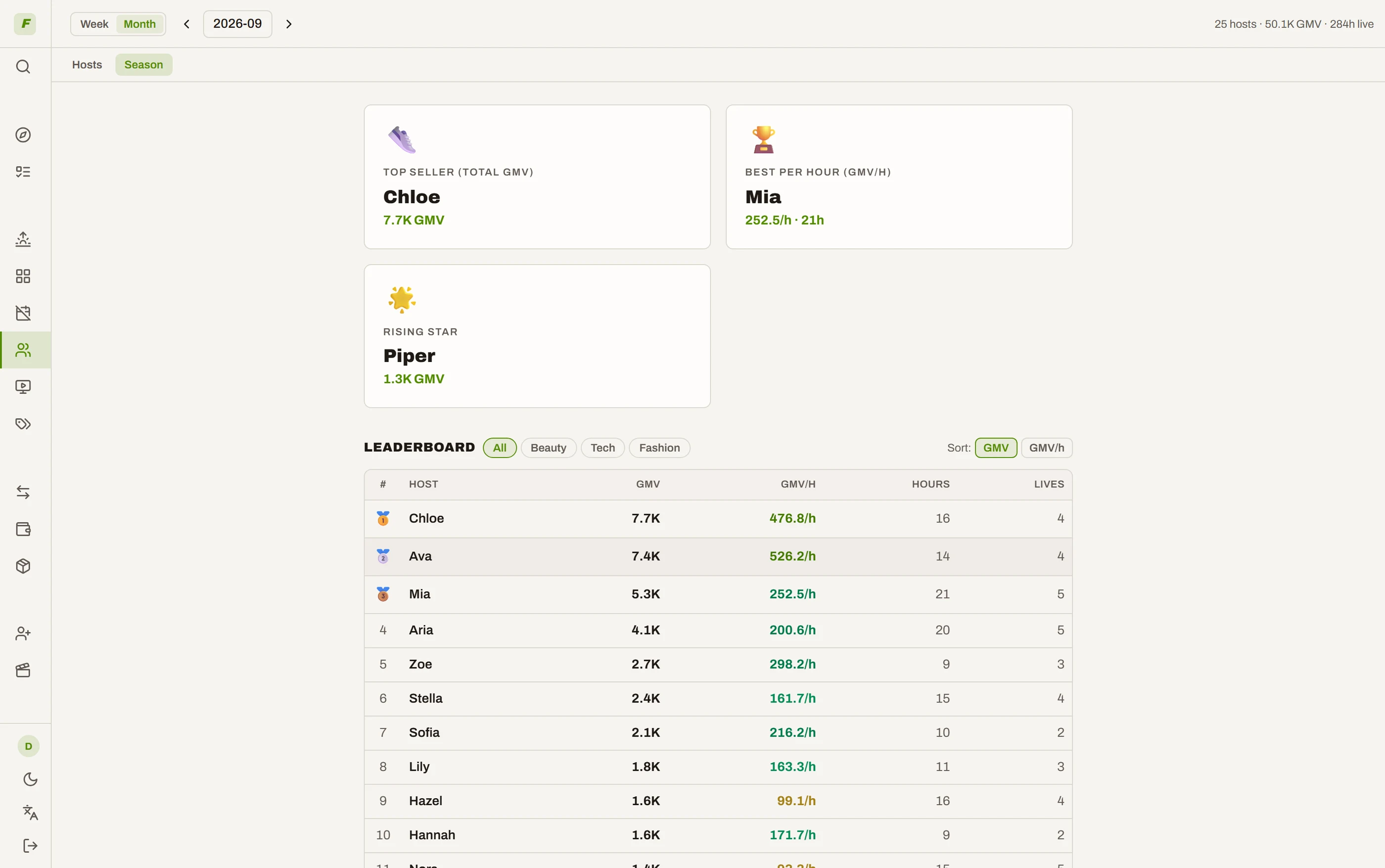
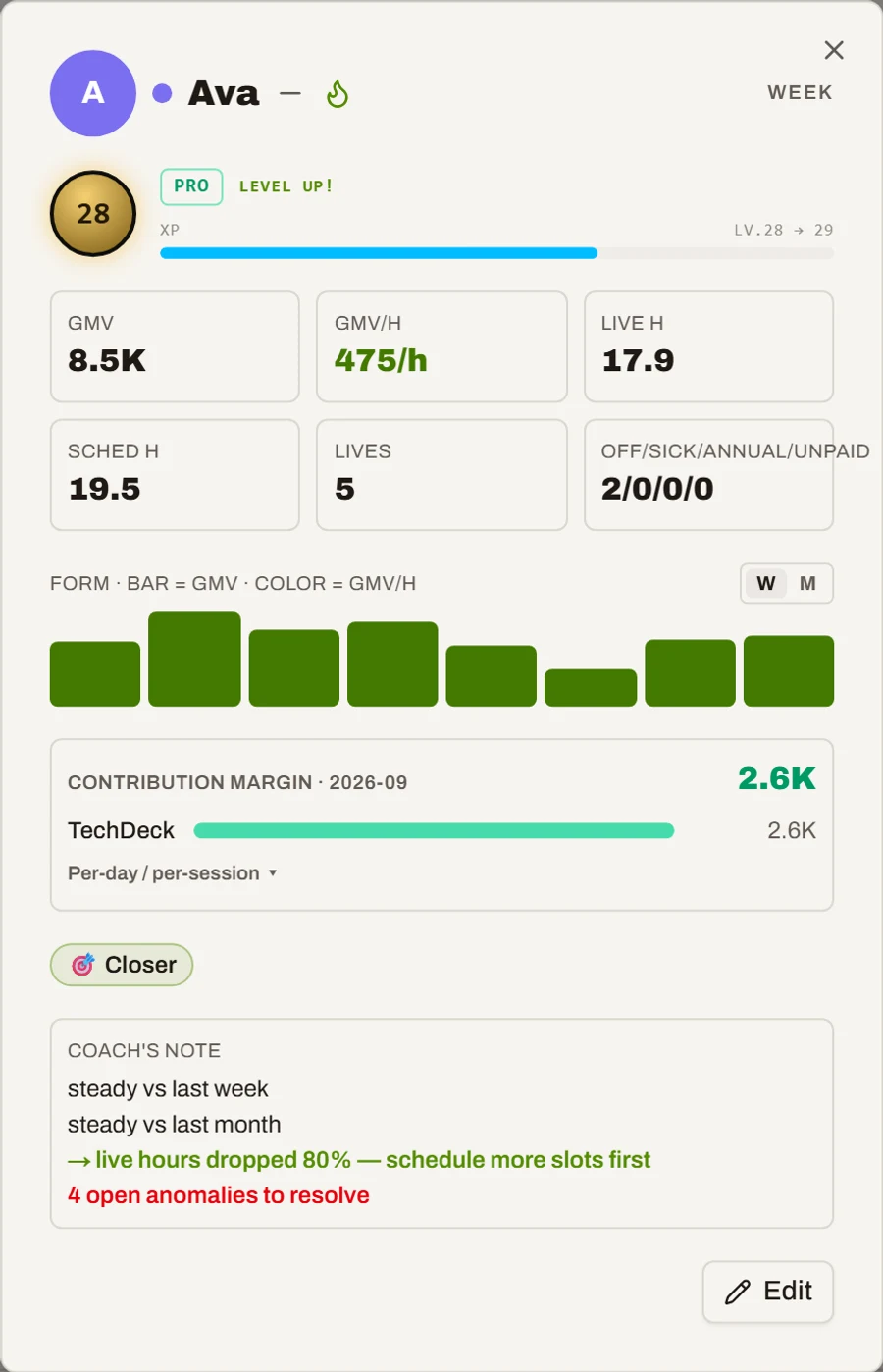
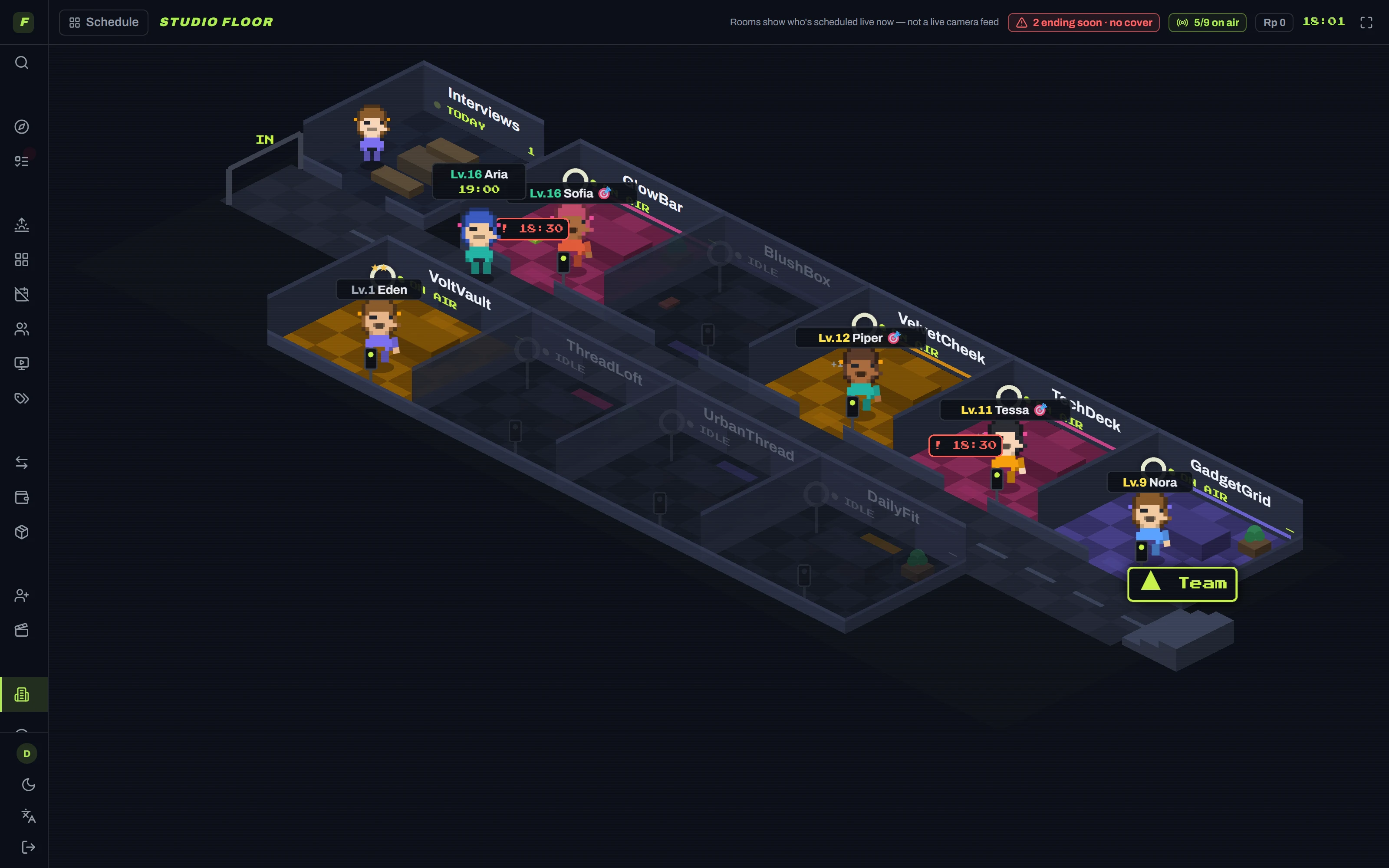
What we do: every host gets a level, a host card, a form curve and a bonus bar, all earned from real output. Your studio is a board you can actually look at — one pixel room per account, a level plate over every host, ON AIR when they're live — and the month closes with four awards: Top Seller, Best per Hour, Rising Star, Biggest Climber.
What you get: the ladder is visible, so climbing it becomes the point.
- Levels and badges earned from real output, not attendance
- A bonus bar every host can see, all month long
- Month-end awards that make the leaderboard mean something
Ops aims to put each host in their best hour. Hosts aim to climb a level. Both are pushing the same number.
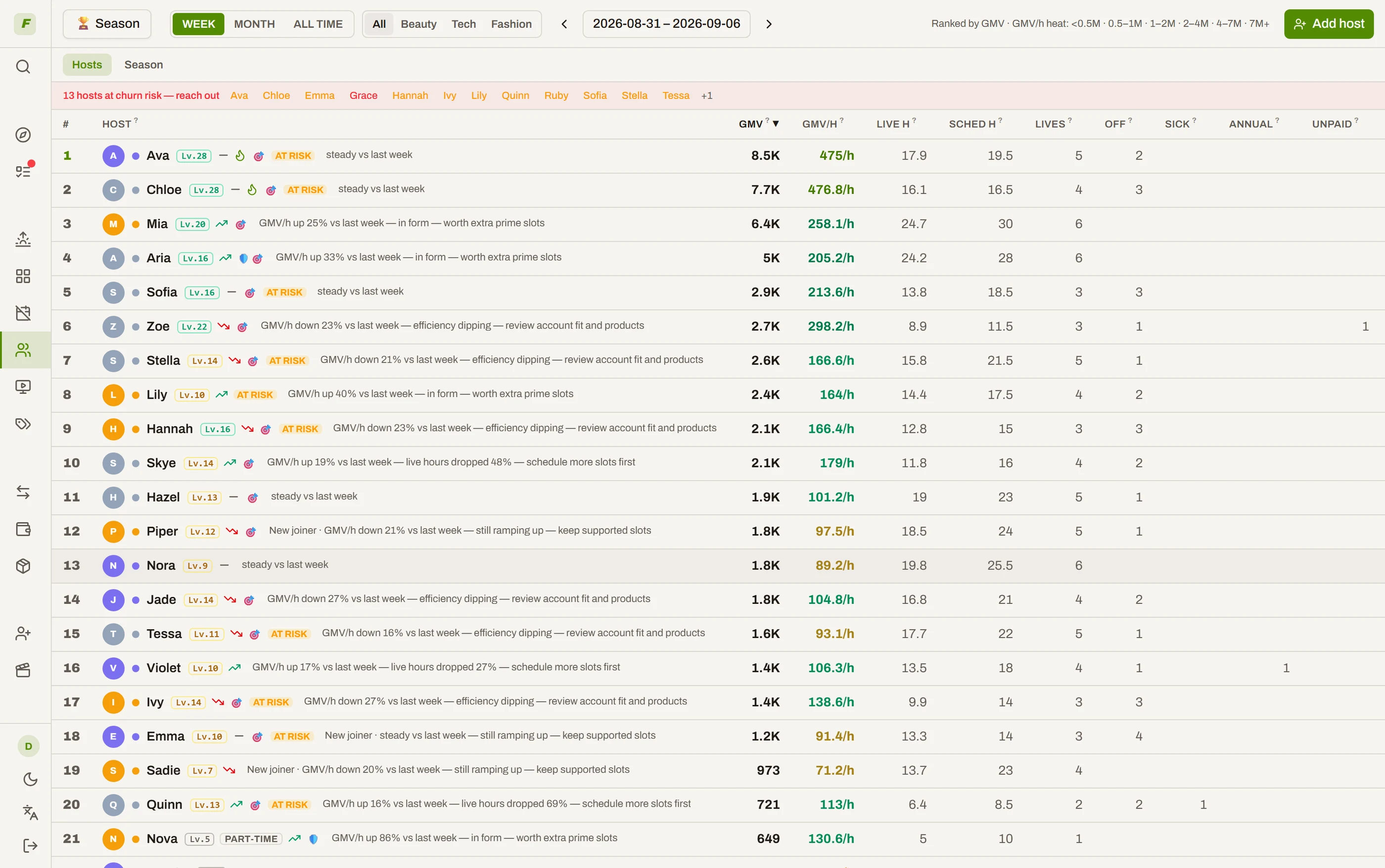
Your morning, in three screens
You shouldn't have to dig for what matters. Every morning the system has already done the digging.
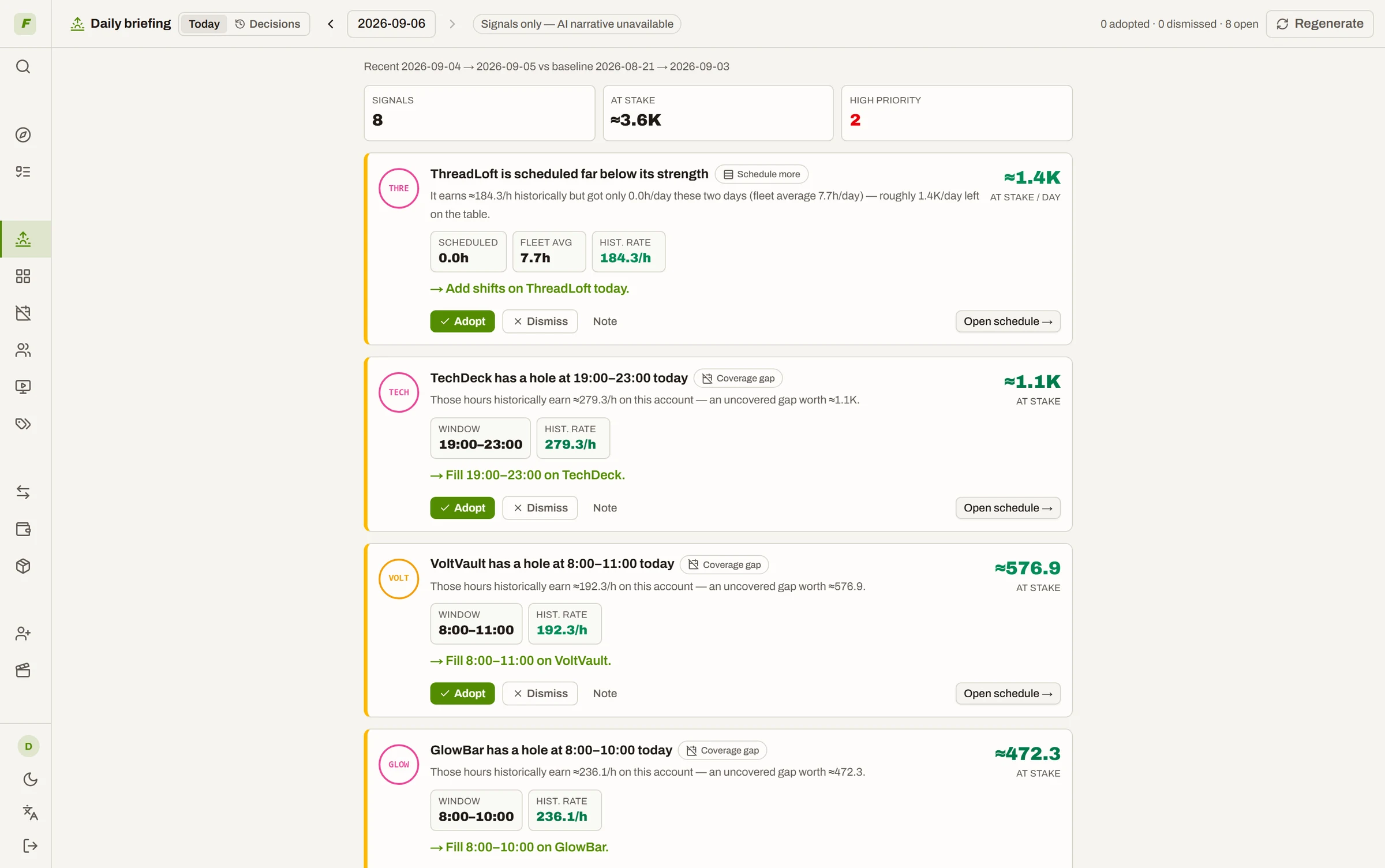
The brief
Signals from the last two days — an account scheduled far below its strength, a host clearly slipping, a strong host sitting idle today — written up by AI, each with one concrete move. Adopt it or dismiss it; the system keeps score of what happened next.
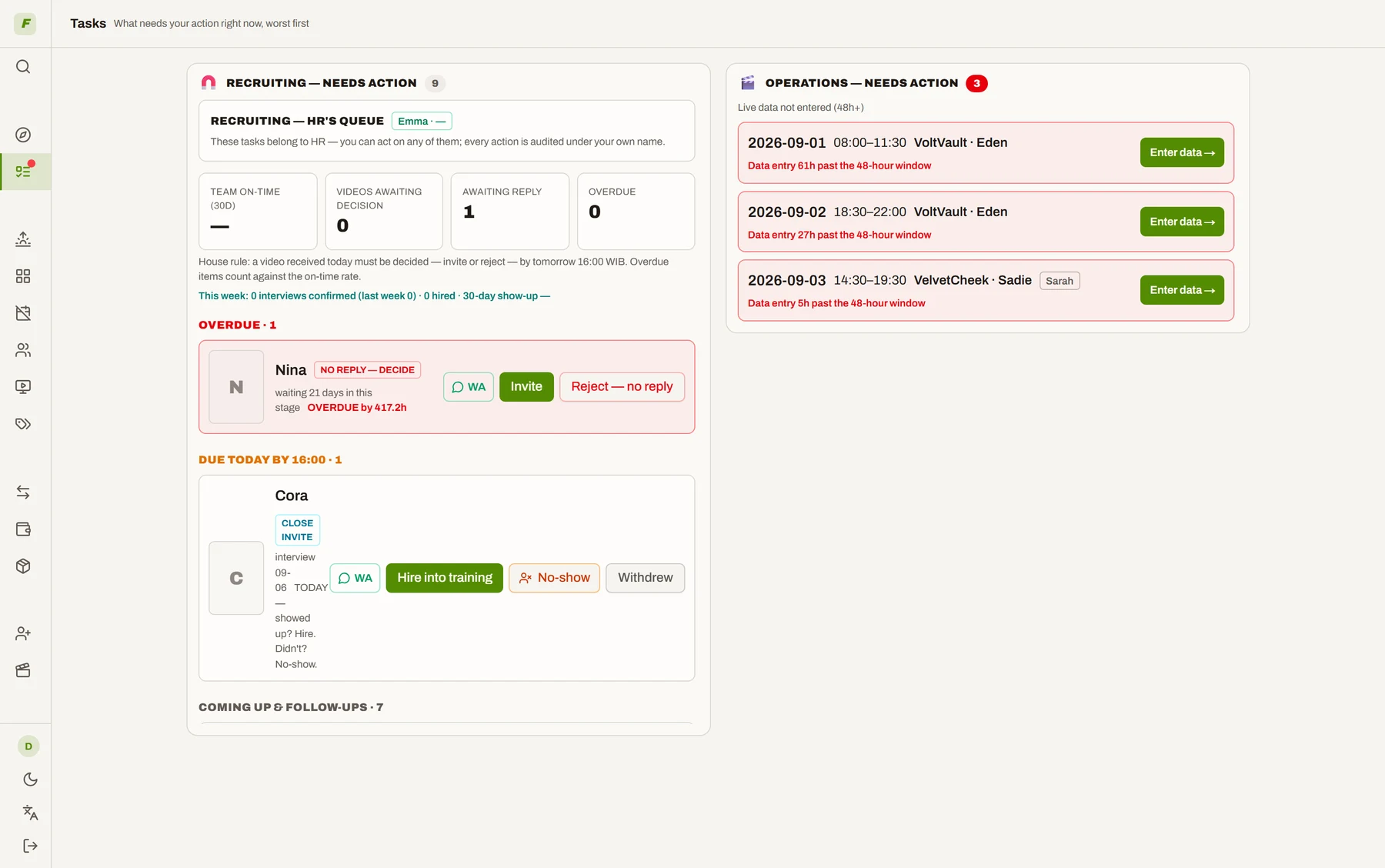
The queue
Every overdue thing, by role: a live session not entered within 48 hours, a candidate video waiting on a decision, a host-day with no status, last month still unlocked. It clears itself as the work gets done.
Today's four lines
Status gaps to fill, tonight's empty prime hours on your best accounts, last month's lock, and who to talk to first. One copy button turns it into a message for your ops group.

Why the numbers the AI acts on are trustworthy
A model is only as good as the data under it. This is the part that keeps ours honest — and it happens to end the payday argument too.
Reconciled against the platform
Recorded session GMV versus TikTok's official figure, account by account. A gap beyond your threshold must carry a written explanation before the month can close.
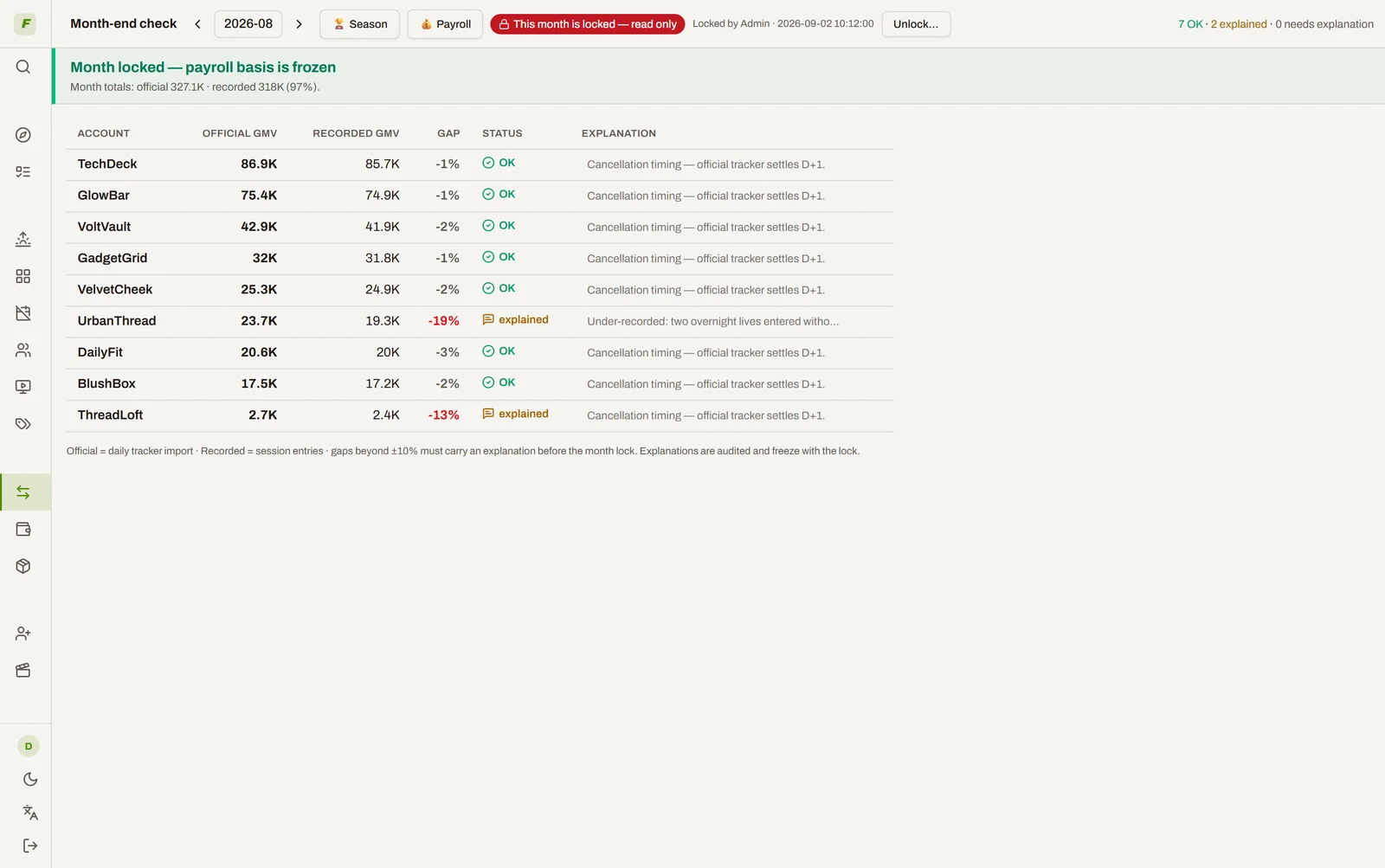
Locked, then never quietly changed
Locking a month freezes the payroll basis for good. A locked month is read-only, unlocking demands a written reason, and every write in the system carries an audit row. A month with an unresolved no-show can't be locked — an admin can force it, and the override is logged.
Payroll falls out of it
Base, GMV bonus, attendance, unpaid days — computed from the locked month, exported as one CSV finance can pay from. Not our headline. Just the argument that stops happening.
And the rest of the job, too
Running a live team is more than the grid. It's all in the same system.
Studio floor
A live-rooms board showing who is on air right now, which rooms go dark soon, and today's GMV per room — the wall screen your ops team actually watches.
Bring your history with you
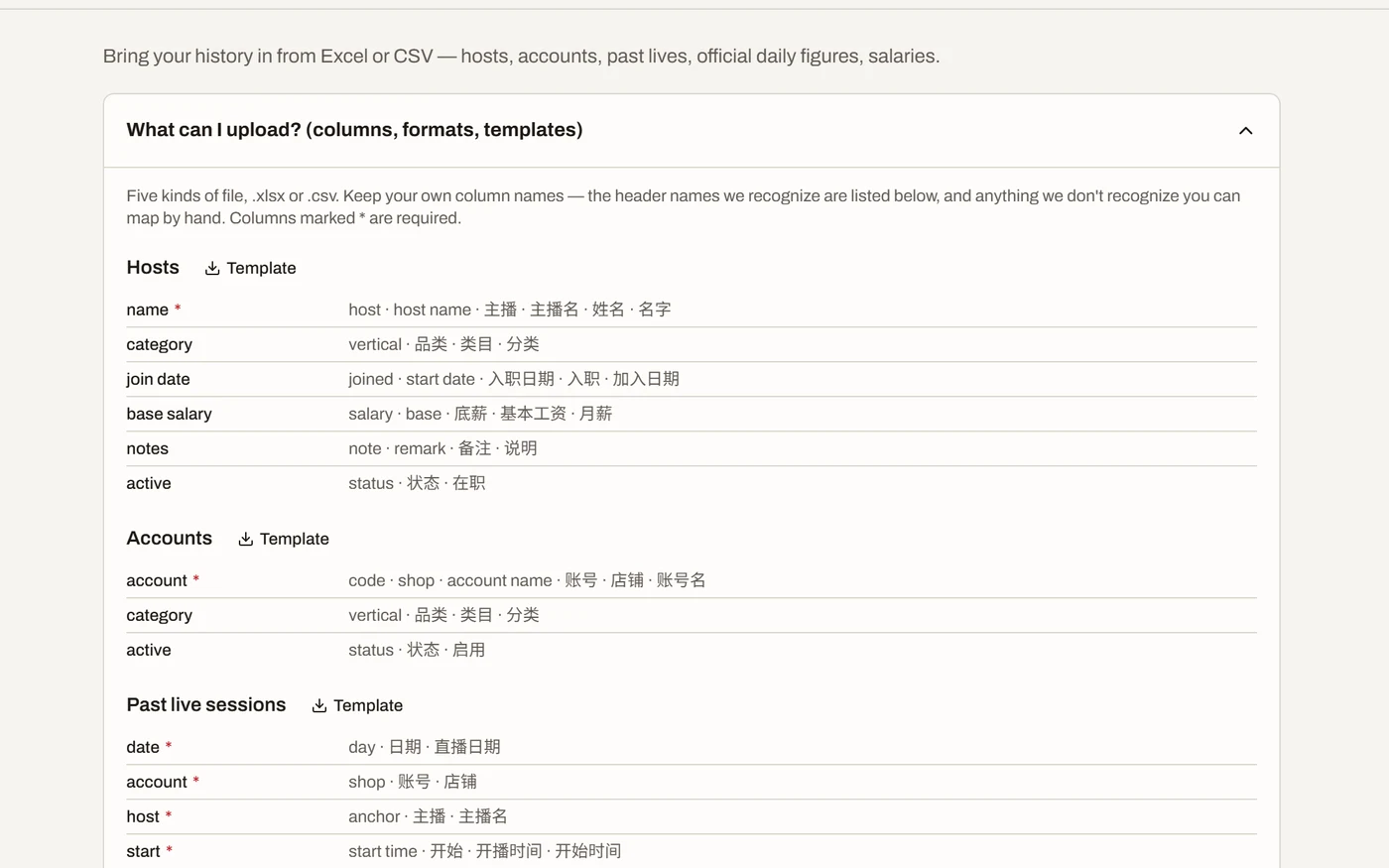
Import your existing hosts, accounts and months of session history straight from Excel or CSV. Map your columns, review what would change, then commit — the loop starts warm instead of empty.
Yours, and only yours
One isolated instance and one database file per customer — no shared tables. Bilingual UI (EN / 中文), light and dark, your timezone, your currency, your holiday calendar.
Who can do what
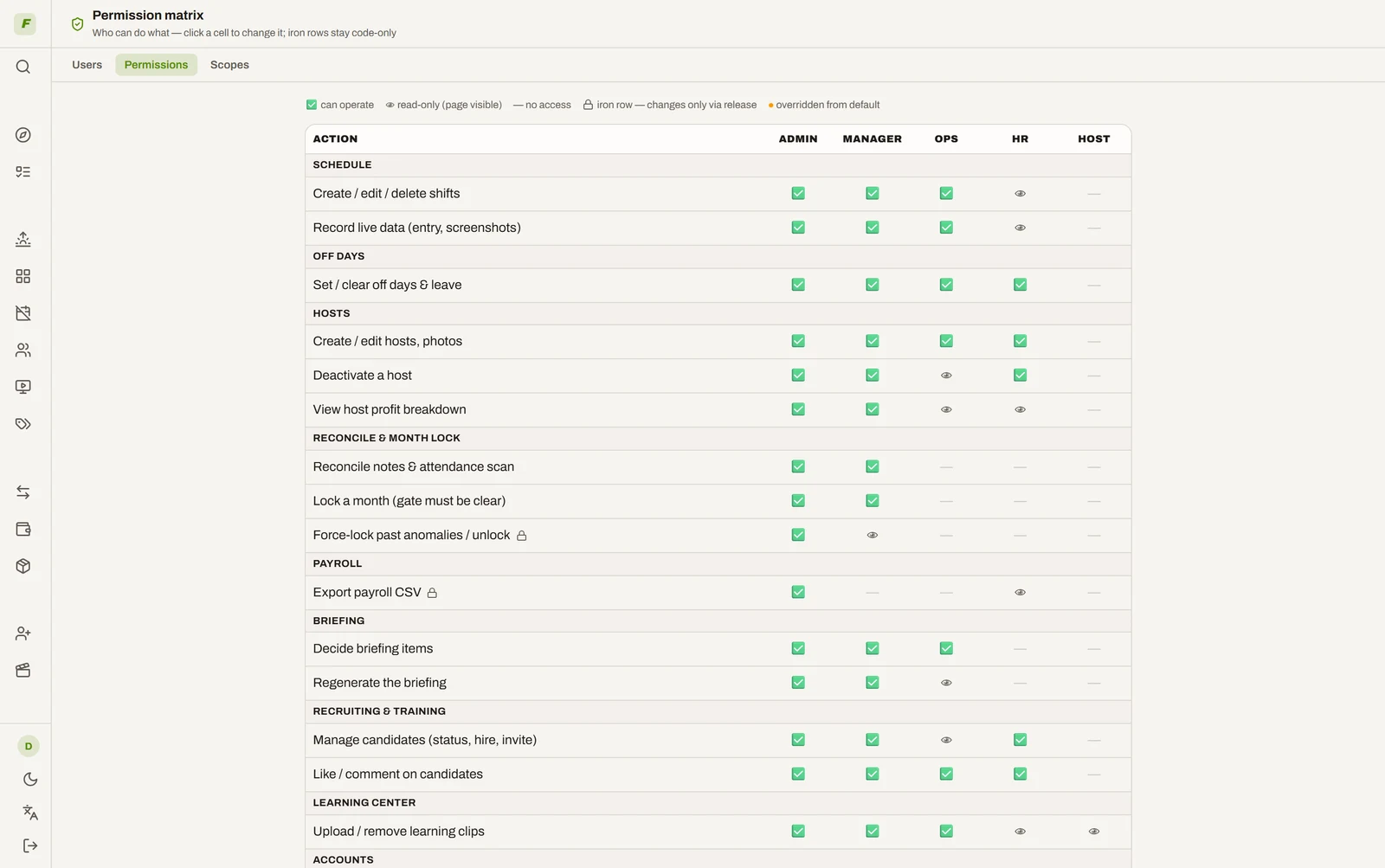
An action-level permission matrix: which roles may lock a month, export payroll, set targets, decide a candidate. Per-user overrides, every change logged.
Every feature here was paid for in real GMV
Most live-ops tools are built by software people guessing at your job. This one was built by operators who had the problem — and had to fix it before payday.
“We run a live-commerce agency. Over three years we hired 300+ hosts and had 60 of them live at the same time at peak — and we ran all of it out of spreadsheets, until the spreadsheets started costing us money. So we built this, and we've run our own operation on it every single day since. Then our peers saw it and asked to buy it.”
Not a pitch deck: a production system. We'll walk you through our real numbers — reconciliation, month locks, payroll — and you can decide whether it fits your team.
Pricing
One flat fee per month by team size. No per-seat math, no surprises.
- All features included
- Isolated instance & database
- White-glove onboarding
- Everything in Starter
- Priority support
- Annual billing −20%
- Everything in Growth
- Priority roadmap input
- Custom terms
- Everything in Pro
- Runs on your own infrastructure
- Data never leaves your network
FAQ
Are you a software company or a live-commerce company?
Both — in that order of experience. We've run a live-commerce agency for three years: 300+ hosts hired, 60 live at the same time at peak, and every payroll computed in this system. TTLive is the tool we built to run it, hardened by three years of real GMV, real reconciliation and real payroll. You are buying an operator's tool, not a founder's hypothesis.
Is my data safe?
Each customer gets an isolated instance and a separate database file — physical isolation, not rows in a shared table. You can export the whole file and leave anytime.
My team is in the US / in China — does it work for both?
The UI is bilingual (English/中文) per user, and each instance runs in your own timezone, currency and holiday calendar.
What if payroll numbers are disputed?
Everything is editable and auditable before the month locks; locking is the payroll sign-off and freezes history. Unlocking requires an admin and a written reason — every step is logged. The system advises; people decide.
How long does it take to get started?
We set the instance up for you — accounts, hosts and your rules — and walk your ops lead through it. Most teams are scheduling in the system the same week.
How do I pay?
Card, or corporate bank transfer with contract and invoice (USD / CNH). Annual billing is preferred and discounted.
How is this different from general shift-scheduling software (When I Work, Deputy, Homebase)?
General schedulers only answer "who works at what time". TTLive runs the live-commerce business itself: GMV and viewers recorded per session, reconciliation against the platform's official figures account by account, a month lock that finalizes payroll, and host rankings by GMV per live hour with bonus tracking. None of that exists in a generic shift tool.
How many hosts do I need before this is worth it?
Three or more hosts going live daily, on salary plus commission — that's the point where spreadsheets start producing errors that cost real money. Up to 15 hosts is the Starter tier.
How does the system know what to do each morning?
It reads the last two days of sessions and the day's schedule, computes the signals — thin coverage on a strong account, a host slipping, a strong host idle — and the AI words them into a brief with one move each. Nothing is executed for you: you adopt or dismiss, and the system tracks what followed.
Do I need any other tool to run it — Lark, Feishu, Excel?
No. Targets, schedules, session entries and attendance are all typed straight into the system. Existing history comes in once, from Excel or CSV, through the importer.
Talk to us
Tell us how many hosts you run and we'll show you what your first week in TTLive looks like.

See it with your own eyes — in one click.
No signup, no form. The demo has 60 days of data and every feature unlocked.
Open the live demo